เขียน Go ดึงข้อมูลเกมส์ลดราคาของ Nintendo Switch ใช้งานเอง


เขียน Go ดึงข้อมูลเกมส์ลดราคาของ Nintendo Switch ใช้งานเองกันเถอะ
เริ่มจากเพิ่งได้เครื่อง Nintendo Switch มาเล่น เลยลองหา API มาเขียนเล่นสักหน่อย ซึ่งใน Store พวก App จำพวก หาเกมส์ลดราคา มันก็มีใช้งานกันอยู่แล้ว แต่เราพอเขียน โปรแกรมได้บ้าง ก็ทำมาใช้เองซะเลยดีกว่า
เริ่มจากไปหา ก่อนว่า Eshop มันมี API ให้ใช้หรือเปล่า จนไปเจอ https://gist.github.com/Shy07 พบว่ามี API ให้ใช้งานบางส่วน แยกเป็นเกมส์ลดราคาแต่ละประเทศ พร้อมสกุลเงินในประเทศนั้นๆ
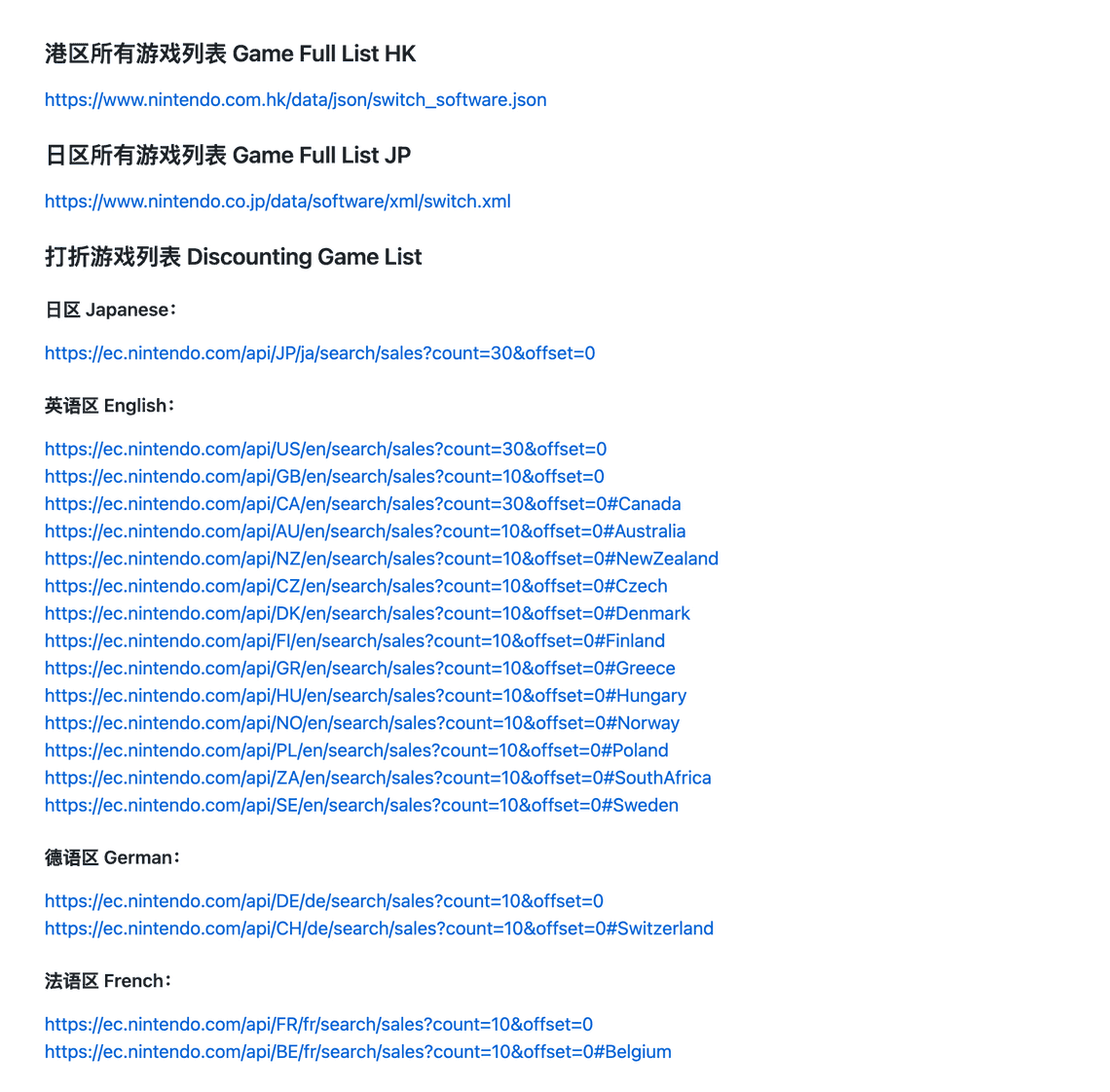
โดยจะ Return Data ออกมาดังนี้
Returncontents: arraycontent_type: stringdisclaimer: stringdominant_colors: string[]formal_name: stringhero_banner_url: stringid: numberis_new: booleanpublic_status: stringrelease_date_on_eshop: stringstrong_disclaimer: stringtags: arraytarget_titles: arraylength: numberoffset: numbertotal: number
ต่อมาจะไปสร้าง package ของ golang กัน ตั้งชื่อว่า discount.go
package discount//Country List const iotaconst (JP = iotaUSGBCAAUNZCZDKFIGRHUNOPLZASEDECHFRBEFRITNLBENLRUESMXCOARCLPEPTBRHKKR)
โดยเราจะสร้าง constant expression สำหรับเก็บ Country List ของ api ที่ให้บริการไว้ เป็น iota
และทำการเก็บ api ไว้ตามลำดับ ประเทศในรูปแบบ array
var api = []string{"https://ec.nintendo.com/api/JP/ja/search/sales?count=30&offset=0","https://ec.nintendo.com/api/US/en/search/sales?count=30&offset=0","https://ec.nintendo.com/api/GB/en/search/sales?count=10&offset=0","https://ec.nintendo.com/api/CA/en/search/sales?count=30&offset=0#Canada","https://ec.nintendo.com/api/AU/en/search/sales?count=10&offset=0#Australia","https://ec.nintendo.com/api/NZ/en/search/sales?count=10&offset=0#NewZealand","https://ec.nintendo.com/api/CZ/en/search/sales?count=10&offset=0#Czech","https://ec.nintendo.com/api/DK/en/search/sales?count=10&offset=0#Denmark","https://ec.nintendo.com/api/FI/en/search/sales?count=10&offset=0#Finland","https://ec.nintendo.com/api/GR/en/search/sales?count=10&offset=0#Greece","https://ec.nintendo.com/api/HU/en/search/sales?count=10&offset=0#Hungary","https://ec.nintendo.com/api/NO/en/search/sales?count=10&offset=0#Norway","https://ec.nintendo.com/api/PL/en/search/sales?count=10&offset=0#Poland","https://ec.nintendo.com/api/ZA/en/search/sales?count=10&offset=0#SouthAfrica","https://ec.nintendo.com/api/SE/en/search/sales?count=10&offset=0#Sweden","https://ec.nintendo.com/api/DE/de/search/sales?count=10&offset=0","https://ec.nintendo.com/api/CH/de/search/sales?count=10&offset=0#Switzerland","https://ec.nintendo.com/api/FR/fr/search/sales?count=10&offset=0","https://ec.nintendo.com/api/BE/fr/search/sales?count=10&offset=0#Belgium","https://ec.nintendo.com/api/IT/it/search/sales?count=10&offset=0","https://ec.nintendo.com/api/NL/nl/search/sales?count=10&offset=0","https://ec.nintendo.com/api/BE/nl/search/sales?count=10&offset=0#Belgium","https://ec.nintendo.com/api/RU/ru/search/sales?count=30&offset=0","https://ec.nintendo.com/api/ES/es/search/sales?count=30&offset=0","https://ec.nintendo.com/api/MX/es/search/sales?count=30&offset=0#Mexico","https://ec.nintendo.com/api/CO/es/search/sales?count=10&offset=0#Columbia","https://ec.nintendo.com/api/AR/es/search/sales?count=10&offset=0#Argentina","https://ec.nintendo.com/api/CL/es/search/sales?count=10&offset=0#Chile","https://ec.nintendo.com/api/PE/es/search/sales?count=10&offset=0#Peru","https://ec.nintendo.com/api/PT/pt/search/sales?count=30&offset=0","https://ec.nintendo.com/api/BR/pt/search/sales?count=10&offset=0","https://ec.nintendo.com/api/HK/zh/search/sales?count=10&offset=0","https://ec.nintendo.com/api/KR/ko/search/sales?count=10&offset=0",}
ขั้นต่อไป เราจะทำการเตรียม type structure สำหรับเก็บ return json ที่ได้รับกลับมาจาก API ที่เราเรียกใช้ ซึ่งมี รูปแบบ JSON ดังนี้
{"contents": [{"content_type": "title","dominant_colors": ["1a2221","f5f5f5","e1ad6b"],"formal_name": "Cooking Simulator","hero_banner_url": "https://img-eshop.cdn.nintendo.net/i/030c5fbd8b3477625586063260316456d6686e82e13945db82327e97a2ab2c4f.jpg","id": 70010000024855,"is_new": false,"membership_required": false,"public_status": "public","rating_info": {"content_descriptors": [{"id": 2,"name": "Alcohol Reference","type": "descriptor"}],"rating": {"age": 6,"id": 2,"image_url": "https://img-eshop.cdn.nintendo.net/i/d96122dbb89250582816a67461bf8080f030402720e46032980582bca516778d.jpg","name": "E","provisional": false,"svg_image_url": "https://img-eshop.cdn.nintendo.net/i/46eb70b11307f05cacc1248b54b18a846be5cdf0414c53f620cb663e5bf942a6.svg"},"rating_system": {"id": 202,"name": "ESRB"}},"release_date_on_eshop": "2020-05-14","screenshots": [{"images": [{"url": "https://img-eshop.cdn.nintendo.net/i/0d3163cafd75cd621f7c8c05165a078bfc7ae107cc10a45c996029d166746faa.jpg"}]},{"images": [{"url": "https://img-eshop.cdn.nintendo.net/i/721f2f505debfd0d5bc83795bddce334637725e9a29ceec35e933eb2fb790c70.jpg"}]},{"images": [{"url": "https://img-eshop.cdn.nintendo.net/i/29f6cb94435d445cf05b8f7f941129c4b10fe4a6eaa33ff885506bc090cdc32e.jpg"}]},{"images": [{"url": "https://img-eshop.cdn.nintendo.net/i/badc449200fc618595ac0219938a30ba44ac67249b23ba1cc0a20b5c84e89f45.jpg"}]},{"images": [{"url": "https://img-eshop.cdn.nintendo.net/i/7a80d3ac5d1fa2d9bc185c7361773815e5b5e3e5bdf7d0158fbe657257dc2d8b.jpg"}]},{"images": [{"url": "https://img-eshop.cdn.nintendo.net/i/c9eb7d42566d4bd2cb0a2d9156c9b5de6b5579d2a1e60f666961d669adb9d24f.jpg"}]}],"tags": [],"target_titles": []}]}
เราจะมาสร้าง Contents Structure กันก่อน
//Contents structtype Contents struct {Contents []Content `json:"contents"`Length int `json:"length"`Offset int `json:"offset"`Total int `json:"total"`}
จากนั้น เราจะมาสร้าง structure Content ในรูปแบบ slice อีกที โดยมีโครงสร้างตามนี้
//Content structtype Content struct {ContentType string `json:"content_type"`DominantColors []string `json:"dominant_colors"`FormalName string `json:"formal_name"`HeroBannerURL string `json:"hero_banner_url"`ID int `json:"id"`IsNew bool `json:"is_new"`MembershipRequired bool `json:"membership_required"`PublicStatus string `json:"public"`RatingInfo RatingInfo `json:"rating_info"`ReleaseDateOnEshop string `json:"release_date_on_eshop"`Screenshots []Images `json:"screenshots"`Tags []string `json:"tags"`TargetTitles []string `json:"target_titles"`}
จากนั้นเราจะค่อยๆไล่ทีเหลือลงไปให้หมด
//RatingInfo structtype RatingInfo struct {ContentDescriptors []ContentDescriptors `json:"content_descriptors"`Rating Rating `json:"rating"`RatingSystem RatingSystem `json:"rating_system"`}//ContentDescriptors structtype ContentDescriptors struct {ID string `json:"id"`ImageURL string `json:"image_url"`Name string `json:"name"`SvgImageURL string `json:"svg_image_url"`Type string `json:"type"`}//Rating structtype Rating struct {Age string `json:"age"`ID string `json:"id"`ImageURL string `json:"image_url"`Name string `json:"name"`Provisional bool `json:"provisional"`SvgImageURL string `json:"svg_image_url"`}// RatingSystem structtype RatingSystem struct {ID string `json:"id"`Name string `json:"name"`}//Images structtype Images struct {Images []URL `json:"images"`}//URL structtype URL struct {URL string `json:"url"`}
จากนั้นเราจะมาสร้าง function GetDiscountGameFrom โดยจะรับ Parameter เป็น Country ตามที่เราประกาศไว้ใน constant expression โดยมีค่าเป็น int และเราอยากได้ JSON ออกมาเป็นโครงสร้างประมาณนี้
{"name": "ノーリロードヒーローズ","id": 70010000026821,"hero_banner_url": "https://img-eshop.cdn.nintendo.net/i/70cd0ed3c4c384c9abf535842688b26c8fb60f8a17bc509e3b0ffbb153a477ca.jpg"},
เราจะได้ function และ output type structure เป็น
type GameDiscount struct {Name string `json:"name"`ID int `json:"id"`Banner string `json:"hero_banner_url"`}func GetDiscountGameFrom(country int) {}
ต่อไปเราจะใช้ http.Get เพื่อทำการดึงข้อมูล JSON จาก API ที่ระบุ
data, err := http.Get(api[country])if err != nil {return nil}if data.StatusCode != 200 {return nil}
จากนั้นเราจะใช้ ioutil เพืิ่อทำการ ReadAll Body จาก data ที่ http.Get ดึงมาได้
body, err := ioutil.ReadAll(data.Body)if err != nil {return nil}
เมื่อเราดึง data มาใส่ body เรียนร้อยแล้ว เราจะทำการ แปลง json ให้เป็น type structure ของเราซะ ด้วย Unmarshal
contents := Contents{}json.Unmarshal([]byte(body), &contents)
หลังจากนั้นเราจะมาจัดการข้อมูลที่มันเยอะเกินความจำเป็นที่เราจะใช้งาน ให้อยู่ในรูปแบบที่เราต้องการนำมาใช้ คือ โครงสร้าง JSON ก่อนหน้านี้
gameList := []GameDiscount{}for _, game := range contents.Contents {FormalName := []rune(game.FormalName)gameFetch := GameDiscount{ID: game.ID,Name: string(FormalName),Banner: game.HeroBannerURL,}gameList = append(gameList, gameFetch)}result, _ := json.MarshalIndent(gameList, "", " ")
เมื่อเราสั่ง fmt print ดู
fmt.Println("", string(result))
{"name": "DAEMON X MACHINA(デモンエクスマキナ)","id": 70010000001400,"hero_banner_url": "https://img-eshop.cdn.nintendo.net/i/ec9e0ebee363785209876bfa034a1c99db2481818650a6ccd52d8cbe5f30d31b.jpg"},{"name": "シャイニング・レゾナンス リフレイン","id": 70010000006416,"hero_banner_url": "https://img-eshop.cdn.nintendo.net/i/8e3b659b798047f768c8f2e853aabf5829ab76149ec05d1e360c682bd3faf752.jpg"},{"name": "ロックマンX アニバーサリー コレクション","id": 70010000003968,"hero_banner_url": "https://img-eshop.cdn.nintendo.net/i/be9efa722d19818f7195ab26a9a0430e17fc6a57408fc14425894b134d05a80e.jpg"},{"name": "Rush Rover","id": 70010000009286,"hero_banner_url": "https://img-eshop.cdn.nintendo.net/i/3df52f3e2dd1b12c3837cb6be328fd26c0f8aac8b646317802805659f4415d2e.jpg"},{"name": "Roombo: First Blood","id": 70010000036110,"hero_banner_url": "https://img-eshop.cdn.nintendo.net/i/2ae9f52ebe0d7cef71d1bd7a78e13f2407ee693d6cd56c7a0cd529038f5154e6.jpg"},
จากนั้นเราจะให้ function นี้ return json ที่เราทำการแปลงแล้วกลับไป เราจะต้องทำการแก้ไข return function GetDiscountGameFrom ของเราเป็น return byte slice ซะก่อน
func GetDiscountGameFrom(country int) []byte {data, err := http.Get(api[country])if err != nil {return nil}if data.StatusCode != 200 {return nil}body, err := ioutil.ReadAll(data.Body)if err != nil {return nil}contents := Contents{}json.Unmarshal([]byte(body), &contents)gameList := []GameDiscount{}for _, game := range contents.Contents {FormalName := []rune(game.FormalName)gameFetch := GameDiscount{ID: game.ID,Name: string(FormalName),Banner: game.HeroBannerURL,}gameList = append(gameList, gameFetch)}result, _ := json.MarshalIndent(gameList, "", " ")return result}
เมื่อเรากลับมาที่ package main ของเรา และทำการเรียกใช้งานจะเขียนประมาณนี้
package mainimport ("fmt""github.com/aofiee/deshop/discount")func main() {response := discount.GetDiscountGameFrom(discount.JP)fmt.Println("", string(response))}
จานั้นเราจะทำการ Parse URL ของ API เพื่อแปลงค่าจาก string เป็น type URL เพื่อที่จะทำการดึง Path ออกมาจาก URL เพราะเราต้องการ อักษรย่อของประเทศ เพื่อนำมาใช้ร่วมกับ ID ของเกมส์ เพื่อดึงราคาเกมส์จาก API ชุดต่อไปดังนนี้
https://api.ec.nintendo.com/v1/price?country={ตัวย่อประเทศ}&ids={รหัสเกมส์}&lang=us
u, _ := url.Parse(api[country])countryCode := parserURL(u)
โดยเราจะนำ URL ที่ทำการแปลง type แล้ว ไปดึงเอาเฉพาะ Path ออกมา แล้วนำค่าหลัง api มาใช้งาน โดยใช้ function การ Split
func parserURL(u *url.URL) string {country := strings.Split(u.Path, "/")return country[2]}
จากนั้นเราจะทำการ เขียน function การ get ส่วนลด โดยส่ง Argument เข้าไปเป็น code เป็น string และ gameID เป็น int
func getPriceWithCountryAndGameID(code string, gameID int) {}
เราจะมาทำการใส่ค่า Country Code เข้าไปใน API URL กัน
priceURL := `https://api.ec.nintendo.com/v1/price?country=` + code + `&ids=` + fmt.Sprintf("%v", gameID) + `&lang=us`
จากนั้นเราจะใช้ http.Get ดึงค่า JSON มาใช้งาน
func getPriceWithCountryAndGameID(code string, gameID int) {priceURL := `https://api.ec.nintendo.com/v1/price?country=` + code + `&ids=` + fmt.Sprintf("%v", gameID) + `&lang=us`data, err := http.Get(priceURL)if err != nil {return}if data.StatusCode != 200 {return}body, err := ioutil.ReadAll(data.Body)if err != nil {return}fmt.Println("", string(body))}
โดยเราจะทำการสร้าง type structure ชื่อว่า Prices เพื่อรองรับ JSON ชุดต่อไปดังนี้
{"personalized": false,"country": "NZ","prices": [{"title_id": 70010000019817,"sales_status": "onsale","regular_price": {"amount": "$29.99","currency": "NZD","raw_value": "29.99"},"discount_price": {"amount": "$2.99","currency": "NZD","raw_value": "2.99","start_datetime": "2020-11-05T14:00:00Z","end_datetime": "2020-12-02T10:59:59Z"}}]}
เราจะได้ type ดังนี้
//Prices structtype Prices struct {Personalized bool `json:"personalized"`Country string `json:"country"`Prices []PricesList `json:"prices"`}//PricesList stucttype PricesList struct {TitleID int `json:"title_id"`SaleStatus string `json:"sales_status"`RegularPrice Regular `json:"regular_price"`DiscountPrice Discount `json:"discount_price"`}//Regular structtype Regular struct {Amount string `json:"amount"`Currency string `json:"currency"`RawValue string `json:"raw_value"`}//Discount structtype Discount struct {Amount string `json:"amount"`Currency string `json:"currency"`RawValue string `json:"raw_value"`StartDateTime string `json:"start_datetime"`EndDateTime string `json:"end_datetime"`}
หลังจากนั้นเราจะมาทำการแก้ไข function getPriceWithCountryAndGameID เพื่อให้ return ค่า Prices structure ออกมาให้กับ GameDiscount structure
และทำการแก้ไข GameDiscount structure ให้รองรับ Prices ด้วย
//GameDiscount structtype GameDiscount struct {Name string `json:"name"`ID int `json:"id"`Banner string `json:"hero_banner_url"`Prices Prices `json:"prices"`}func getPriceWithCountryAndGameID(code string, gameID int) Prices {priceURL := `https://api.ec.nintendo.com/v1/price?country=` + code + `&ids=` + fmt.Sprintf("%v", gameID) + `&lang=us`data, err := http.Get(priceURL)if err != nil {return Prices{}}if data.StatusCode != 200 {return Prices{}}body, err := ioutil.ReadAll(data.Body)if err != nil {return Prices{}}prices := Prices{}json.Unmarshal([]byte(body), &prices)return prices}
และทำการแก้ไข GetDiscountGameFrom function ให้มีการดึงราคาเกมส์ออกมาให้เรา
for _, game := range contents.Contents {price := getPriceWithCountryAndGameID(countryCode, game.ID)FormalName := []rune(game.FormalName)gameFetch := GameDiscount{ID: game.ID,Name: string(FormalName),Banner: game.HeroBannerURL,Prices: price,}gameList = append(gameList, gameFetch)}
แล้วก็มาแก้ไข package main เรากัน ให้มันเป็น Restful เป็นอันเสร็จการทดลอง
package mainimport ("fmt""net/http""github.com/aofiee/deshop/discount")func main() {handleRequest()}func handleRequest() {http.HandleFunc("/", gameList)http.ListenAndServe(":1234", nil)}func gameList(w http.ResponseWriter, r *http.Request) {response := discount.GetDiscountGameFrom(discount.NZ)fmt.Fprint(w, string(response))}
Download Source Code ได้ที่นี่


Khomkrid Lerdprasert
Technical Lead — building AI-powered platforms, omni-channel chat systems, and telemedicine solutions with Go, Next.js & clean architecture. 20+ years shipping software from crypto wallets to e-learning systems. Bangkok-based. Writes code late at night, brews beer on weekends.